
What Makes a Good Hackathon Project Idea, and How Do Teams Find One?
You signed up for the hackathon. You have a team, or at least a Discord thread with two people who …
Read More
A plain explainer of hackathon platforms: event pages, RSVPs, team building, submissions, judging and community tools, for builders, sponsors and donors.
Every hackathon runs on software, even the scrappy ones. Somebody builds an event page, somebody collects RSVPs, teams find each other in a chat channel, projects get submitted somewhere, and judges score them on a form or a spreadsheet. The tools behind those steps are what people mean when they talk about hackathon platforms.
I want to explain how those tools fit together, because the choice of platform decides a lot. It shapes who finds the event, how easy it is for a first-timer to show up, how fairly projects get judged, and what a sponsor can see after the weekend is over. At C.O.D.E Philadelphia we run weekly coding sessions and quarterly hackathons at venues like Pennovation Works, so we think about this stack constantly. This guide is written for builders deciding where to spend a weekend, and for the sponsors, CSR managers and donors who fund these events and want to understand what their support pays for.
A hackathon platform is any software that runs part of a hackathon’s lifecycle: promoting the event, handling registration, forming teams, collecting project submissions, managing judging and keeping participants connected afterward. Some platforms try to cover every stage. Many organizers combine several smaller tools instead. The choice matters to participants, organizers, sponsors and donors alike.
The easiest way to understand hackathon platforms is to stop thinking about brands and start thinking about jobs. A hackathon has a predictable life cycle, and each phase needs a tool to handle it. Once you see the jobs, comparing any two products gets much simpler, because you can ask which jobs each one actually does well.
Some products try to cover all six jobs in one place. Others are excellent at one or two. An organizer’s real decision is how many of these jobs to hand to a single vendor and how many to handle with lightweight tools the community already uses.
I find this framing useful for participants too. If you know a hackathon handles submissions through a structured platform, you know your project write-up and repository link will matter to judges. If submissions happen through a simple form and a live demo, your three minutes on stage carry more weight.
 In-person hackathons rely on several tools working together behind the scenes.
Hackathon software falls into four broad categories. Each one grew out of a different need, and that origin explains most of its strengths and weaknesses.
Hosted competition platforms are built around the submission and judging stages. They give each hackathon a public listing, a participant registration flow, a project gallery and a judging interface. Devpost, TAIKAI, HackerEarth and Eventornado are examples of products in this space, and Major League Hacking runs a large student hackathon league with its own tooling and member events.
The strength of this category is structure. Every project ends up in the same format, with the same fields, which makes judging and archiving easier. The tradeoff is that structure can feel heavy for a small community event, and participants sometimes treat the gallery as the goal instead of the build.
Event and RSVP tools focus on discovery and registration. They make an attractive page, handle sign-ups and waitlists, send reminders and sometimes sell tickets. They do not usually handle project submission or judging. For a meetup-style hackathon, this category often does the heaviest lifting, because getting the right people in the room is the hardest part.
Discord, Slack and similar chat servers handle the building-support stage and the long tail after the event. Channels for announcements, team finding, mentor help and per-team rooms turn a chaotic weekend into something organized. These tools also keep people talking between events, which no submission gallery can do on its own. Our Discord server has 490+ active builders, and it is where most of the actual collaboration between our events happens.
A separate group of products targets companies running internal hackathons, idea challenges or recruiting contests. Agorize, Mettl’s hackathon tools, Unstop, Skipso and Ideawake sit in or near this space. They add features corporate programs need: single sign-on, private idea pipelines, candidate assessment and reporting for leadership.
For a CSR program manager, it helps to know this category exists, because it is built for a different goal. Internal innovation software is designed to capture ideas for one company. Community hackathons are designed to build skills and relationships across a city. Both are valid, but the software that fits one rarely fits the other.
Here is how the four categories line up against the six jobs. The pattern is clear: no single category covers everything well, which is why most real events combine tools.
Hackathon software categories compared by the jobs they handle
| Category | Strongest at | Weaker at | Best fit |
|---|---|---|---|
| Hosted competition platforms | Submissions, judging, project galleries | Ongoing community between events | Large or online competitions |
| Event and RSVP tools | Discovery, registration, reminders | Submissions and scoring | Meetup-style and in-person hackathons |
| Community and chat tools | Team forming, mentoring, long-term connection | Formal registration and judging records | Recurring communities of builders |
| Enterprise innovation platforms | Private idea pipelines, reporting, access control | Public, open participation | Internal company hackathons and challenges |
Luma and Partiful are two event and RSVP tools that many tech meetups use. Both make it quick to publish a good-looking event page and collect RSVPs, but they come from different directions and suit different kinds of gatherings.
Luma leans toward recurring, professional and community events. It supports calendars that people can subscribe to, so a community that hosts something every week can keep members aware of every session without reposting each one. It supports approval-based registration, registration questions, ticketing for paid events and check-in at the door. Those features map well onto hackathons, where organizers often need to know a participant’s skill level or cap attendance to fit a venue.
Partiful leans toward casual, social gatherings. Its pages feel playful, RSVPs are fast, and guests often respond through a text-message style flow. That low-friction feel is great for a launch party, a post-hackathon social or a small informal build night. It has fewer tools for structured registration questions and recurring community calendars.
Neither tool handles project submission or judging. Organizers who use either one still need a separate way to collect projects and score them. For many community hackathons, that gap is fine, because a simple form plus live demos does the job.
The format of a hackathon changes which jobs are hardest, and that changes which tools matter most. A platform that is perfect for a global online event can be overkill for a Saturday at a local venue.
Online hackathons In an online event, the platform is the venue. Discovery, team formation and submission all happen in software, and there is no hallway where people bump into each other. Hosted competition platforms are popular here because they give remote teams a shared structure. Chat servers carry the social weight, with voice channels standing in for table conversations. For an online hackathon for beginners, the most useful features are clear channels for asking questions and scheduled check-ins with mentors.
In-person hackathons In an in-person event, the room does much of the work. Teams form over coffee, mentors walk between tables and demos happen on a projector. Software mainly needs to get people there and capture what they built. An RSVP tool, a chat server for announcements and a short submission form often cover everything.
Hybrid hackathons Hybrid events are the hardest to run well. Remote participants can easily feel like second-class guests. The platform needs to give them equal access to announcements, mentors and demo time. Organizers usually lean on a chat server as the shared space and stream demos so remote teams present the same way local teams do.
Domain-specific events add their own requirements. Organizers of healthcare hackathons, for example, often need to provide synthetic or de-identified datasets and remind teams not to upload real patient data to a public project gallery. A security-focused event may need sandboxed environments. The theme shapes the stack as much as the format does.
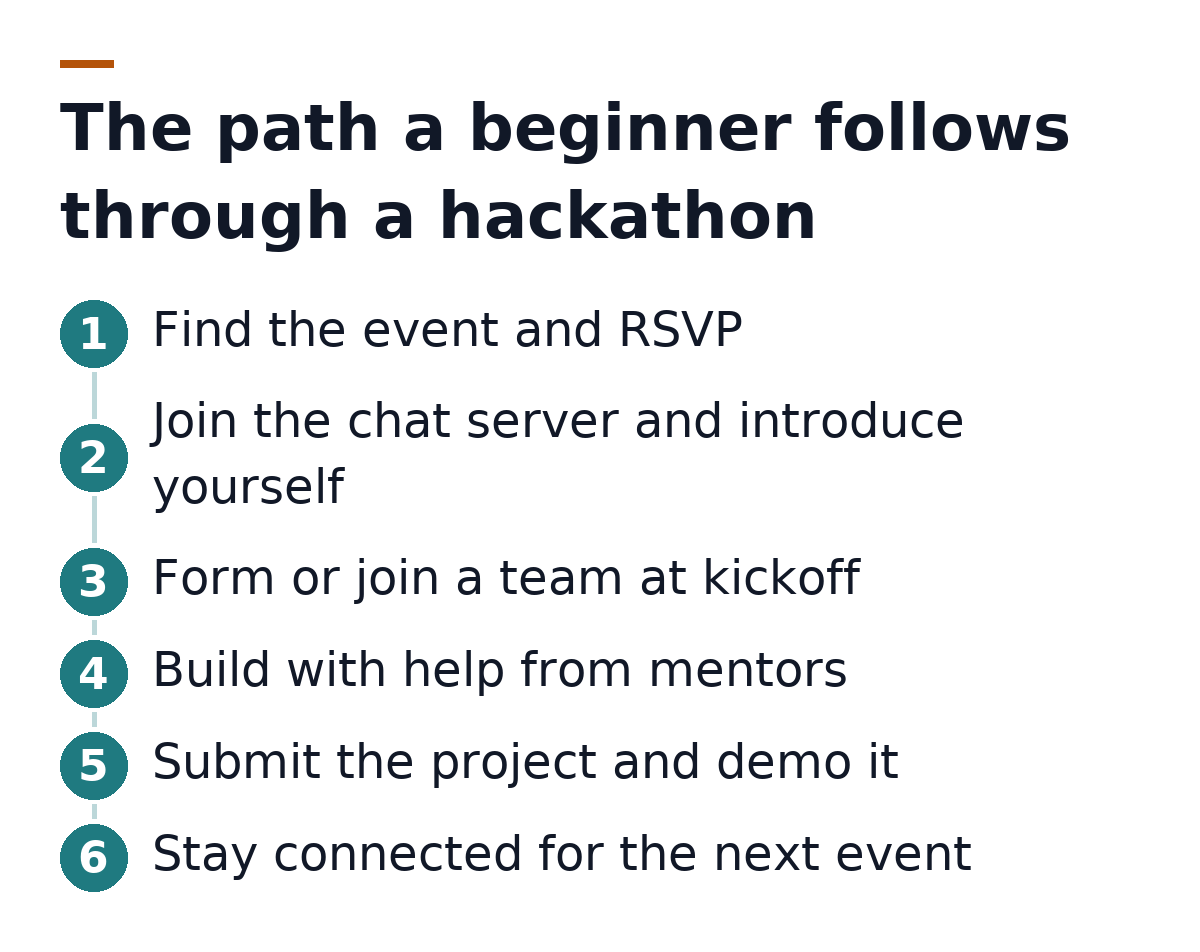
A beginner-friendly hackathon platform removes the small points of confusion that make a first-timer give up. The software itself does not teach anyone to code. What it can do is make the event feel understandable and safe to try.
I have watched plenty of bootcamp graduates and early-career developers walk into their first hackathon, and the questions they ask are rarely about code. They want to know whether they need a team already, what they are supposed to submit, and who they can ask for help without feeling silly. Good platform choices answer those questions before anyone has to ask.
Hackathons for beginners also work better when the software stays out of the way. Asking a first-timer to create accounts on four different services before they write a line of code is a real barrier. Fewer tools, each with an obvious purpose, usually beats a long list of integrations.
If you are new to hackathons, look past the prize list and check three things on the event page: whether beginners are explicitly welcome, how teams form and where you can ask for help during the build. Those details predict your experience far better than the software brand.
The submission and judging stage is where platform choice affects fairness most directly. A good setup gives every team the same format, gives judges the same criteria and leaves a record anyone can check later.
Structured competition platforms handle this with fixed project fields, judge assignments and scoring forms. Community events often recreate the same thing with lighter tools: a form for submissions, a shared rubric and live demos. Either approach can be fair. What matters is consistency.
A typical lightweight submission might collect the fields below. Each line is one piece of information judges use.
team_name: Transit Pals
members: 3
project_title: Bus delay alerts for SEPTA riders
problem: Riders miss connections when buses run late
repository: link to public code repository
demo: link to short demo video
tools_used: Python, open transit data, an LLM API
what_works_now: Alerts for two routes
what_is_next: Add more routes and a simple web interface
The team name, members and title identify the entry. The problem line tells judges what the project is for. The repository and demo links let judges verify that the project runs. The tools line helps sponsors see whether their APIs were used. The last two lines are the most honest part of any submission: what works right now and what the team would build next. Judges tend to trust teams that state their limits clearly.
For participants, the takeaway is simple. Whatever platform an event uses, treat the submission as part of the project. A clear write-up and a working link make a modest project look credible, and a vague one makes a strong project easy to overlook.
Open hackathons are events anyone can join, as opposed to internal company events or invitation-only competitions. The term also appears in research and scientific computing, where some programs pair teams with mentors to port or speed up code over several days. In everyday developer use, an open hackathon simply means public registration.
Public hackathon lists are calendars that collect upcoming events in one place. They help builders find events, but they come with tradeoffs. Large lists tend to favor online events and big-prize competitions, since those are easiest to aggregate. Local, community-run events often show up only on their organizer’s own calendar, meetup page or chat server.
For Philadelphia-area developers, a local calendar is often the best hackathon list there is. Our events go out through our Meetup group, where we have 5,700+ members, and through our Discord server.
Sponsors and donors should judge a hackathon platform by what it reveals about the community, not by how polished the software looks. A slick gallery can hide an event where few people came back. A plain form can sit on top of a community that meets every week.
If you manage a CSR budget or give to tech nonprofits, these are the questions I would ask any organizer, including us. They are fair questions, and a credible organization should answer them directly.
Privacy deserves its own mention. Hackathon registrations often collect names, emails and sometimes demographic or experience data. Sponsors should know what data is collected, who can see it and whether participants agreed to share it with sponsors. A trustworthy organizer answers that clearly.
The most useful signal for a funder is continuity. A hackathon that feeds into a weekly session, a mentoring channel or a recurring calendar keeps paying off after the weekend. One-off events can be exciting, but the skill growth and hiring relationships that sponsors care about usually come from people showing up again and again.
Our setup follows the jobs-first approach from earlier in this guide. We pick a tool for each job and keep the total number small, so newcomers can get from RSVP to building quickly.
We publish events and collect RSVPs through our event pages and our Meetup group. Our Discord server is the place for team finding, announcements, mentor help and everything that happens between events. Our quarterly hackathons, held at venues like Pennovation Works, use themes such as our AI Agent Hackathon to give teams a shared starting point. Weekly coding sessions keep people building in the weeks between hackathons, which is often where hackathon prototypes turn into real projects.
We describe ourselves as a working community, not a networking happy hour, and our tool choices follow from that. We favor tools that get people coding side by side over tools that mainly produce a gallery. Our founder, Tony Siu, is an agentic AI engineer with research published at CAIP 2025 and a background at Google and several venture-backed startups, and that hands-on background shapes how we design events: build first, present second.
We are a volunteer-run nonprofit founded in 2024, and sponsorships and donations fund the venues, food and programming that make these events free and open to builders of every skill level. In 2026, our focus is the same as it was at the start: more people writing real code in the same room, with help nearby when they get stuck.
If you want to build at our next hackathon or weekly session, join C.O.D.E Philadelphia on Meetup or Discord and come code with us. If you are a company or donor who wants more Philadelphia developers to gain real project experience, sponsor or donate to C.O.D.E Philadelphia, or volunteer at one of our hackathons to mentor the next group of builders.
Powered by gofylo.io